> ## Documentation Index
> Fetch the complete documentation index at: https://adp-doc.laiye.com/llms.txt
> Use this file to discover all available pages before exploring further.
# ADP API
> This document serves as the official standardized OpenAPI specification for Laiye ADP Platform. It exposes core intelligent capabilities including document parsing, structured document extraction, and intelligent workflow orchestration via standard APIs, enabling rapid integration with various enterprise business systems.
## OpenAPI Usage Guide
### Step 1: Obtain API Key and APP ID
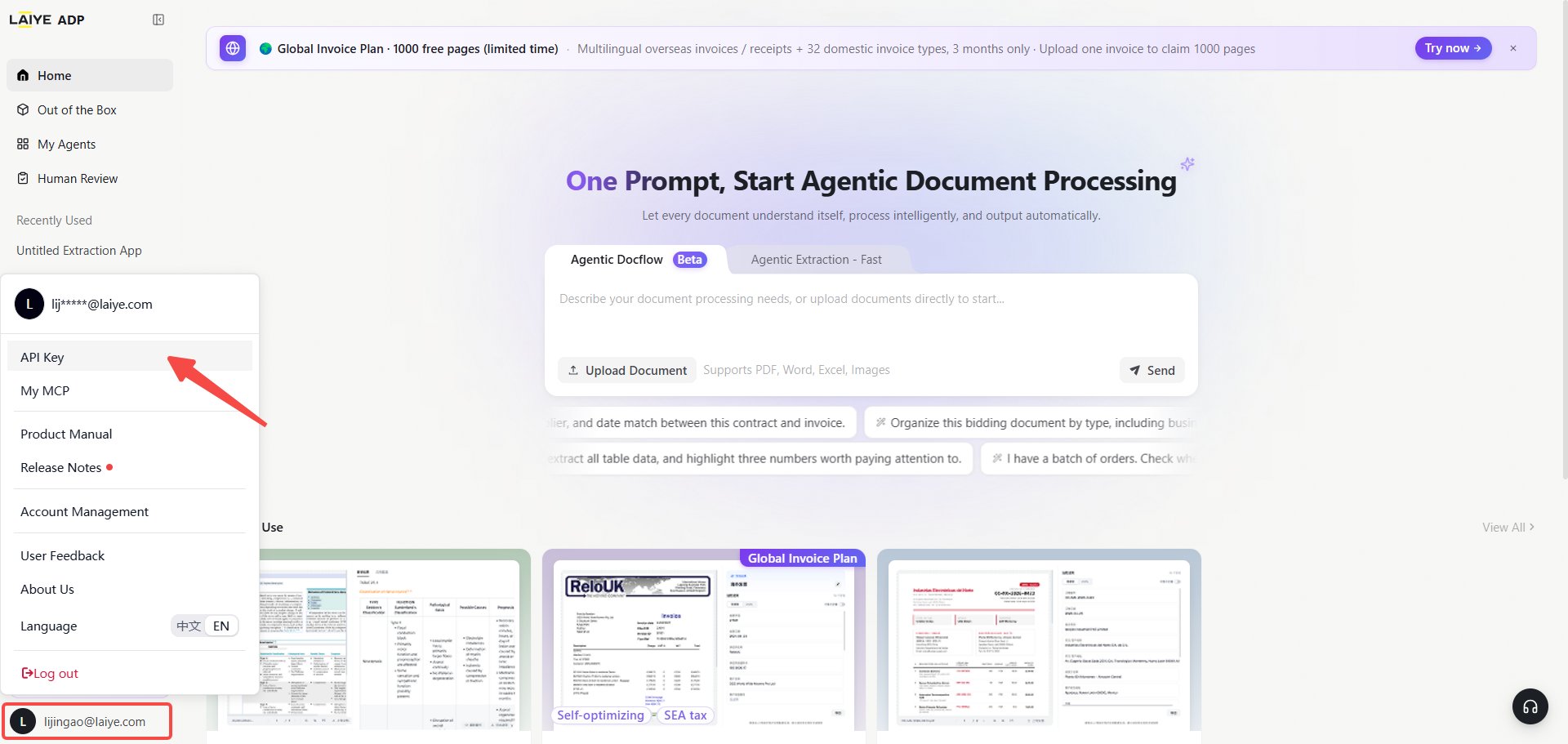
The `API Key` serves as the global identity credential for invoking the entire set of ADP OpenAPIs. It verifies the access permissions of the calling enterprise or account. This credential must be included for all API requests; any request without a valid API Key will be directly blocked by the gateway.
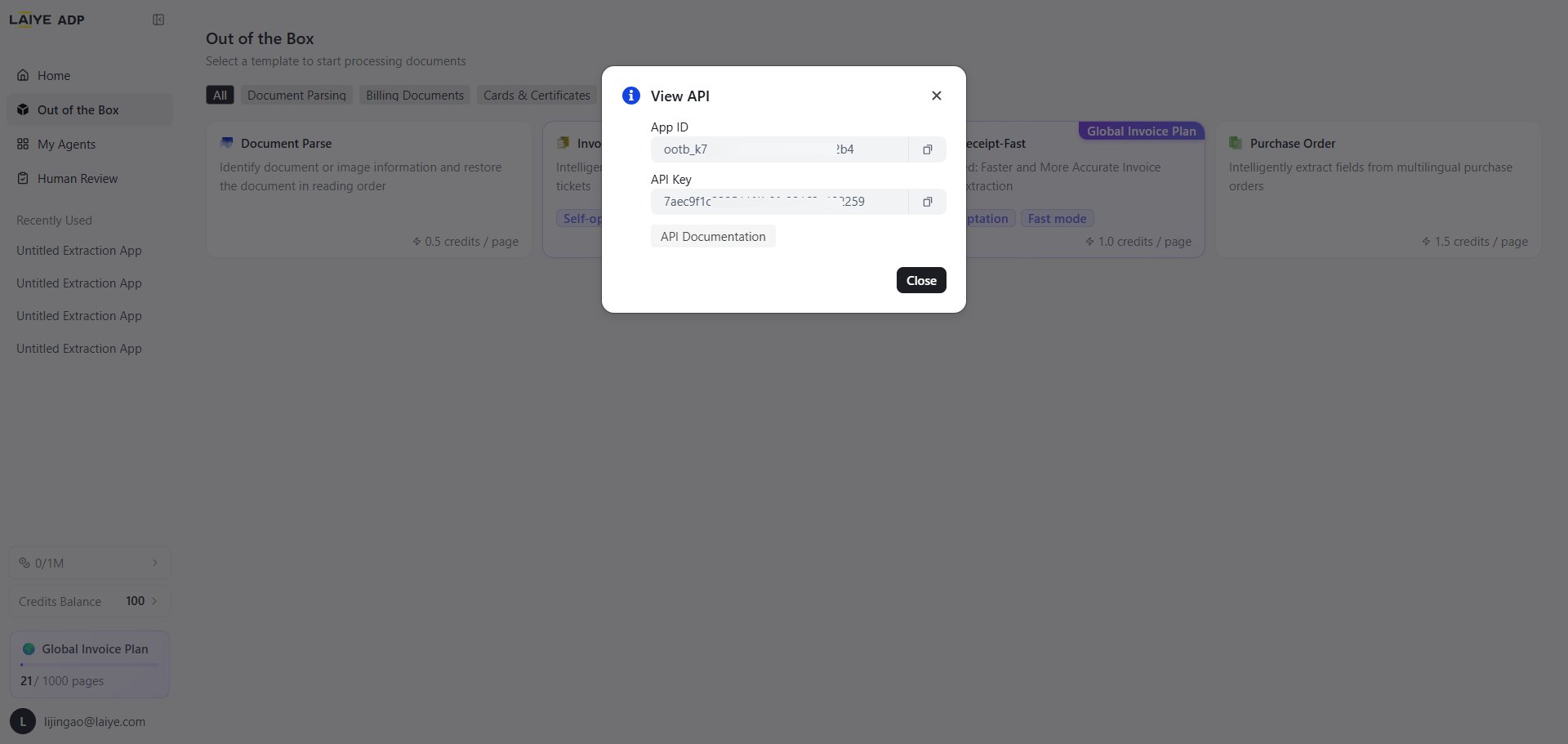
The `APP ID` is the unique identifier of a single application within ADP. It identifies the target application you intend to operate and invoke. As a core business parameter for document extraction, workflow execution and application configuration APIs, it defines the ownership of capabilities.
#### How to get your API Key?
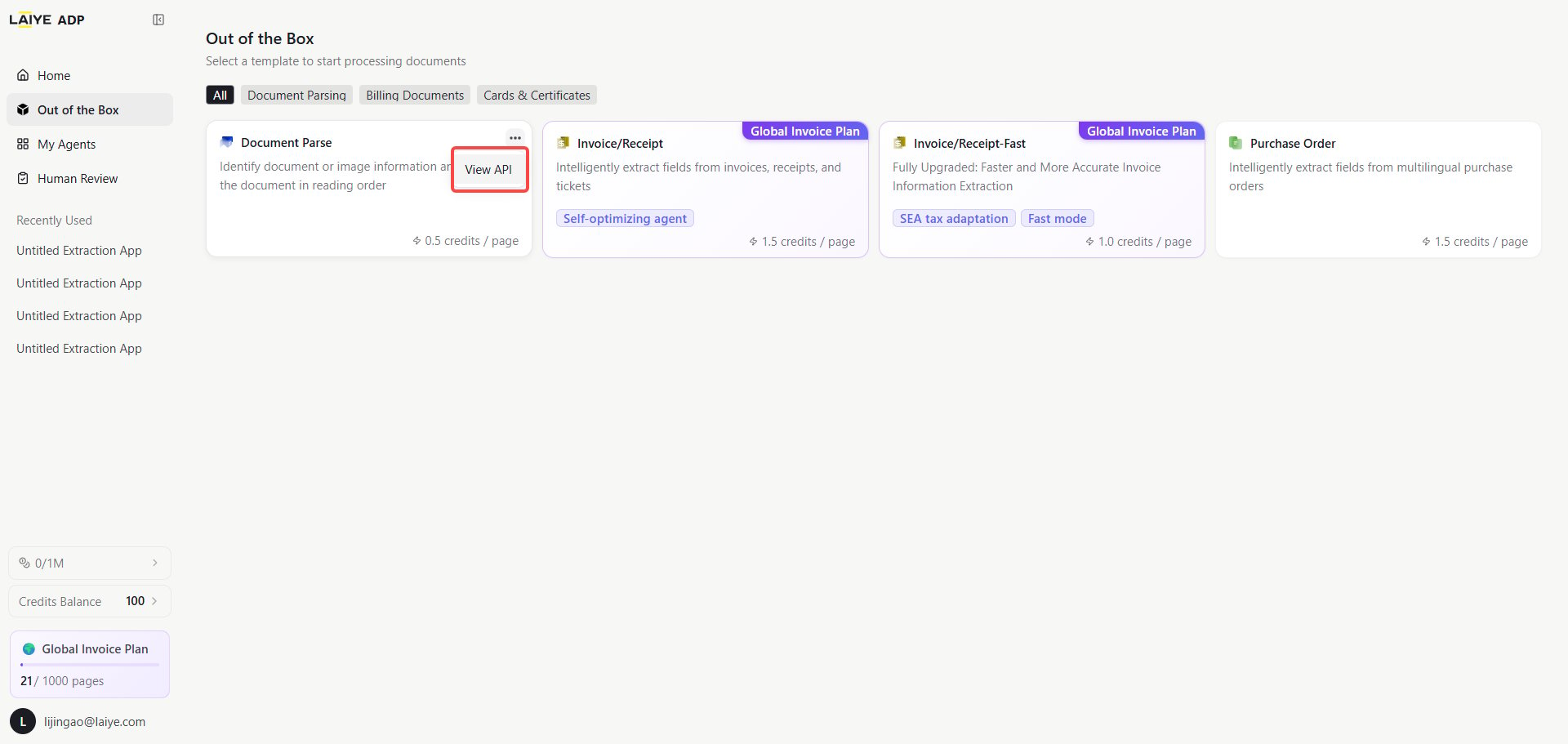
You need to log in to the [ADP platform](https://adp-global.laiye.com/?utm_source=apidoc) to retrieve your API Key. Click your personal avatar and go to My APIs to view your token. Alternatively, click the "..." icon in the upper-right corner of the target application card you want to invoke.
 #### How to get your APP ID?
Method 1: Navigate to the ADP Platform ([https://adp-global.laiye.com/?utm\_source=apidoc](https://adp-global.laiye.com/?utm_source=apidoc)), click the "..." icon in the upper right corner of the target application card to view your `APP ID` and `API Key`.
Method 2: Query the full list of your applications via API. [API for querying application list](/en/api-reference/adp-api/application-management/list-applications)
#### How to get your APP ID?
Method 1: Navigate to the ADP Platform ([https://adp-global.laiye.com/?utm\_source=apidoc](https://adp-global.laiye.com/?utm_source=apidoc)), click the "..." icon in the upper right corner of the target application card to view your `APP ID` and `API Key`.
Method 2: Query the full list of your applications via API. [API for querying application list](/en/api-reference/adp-api/application-management/list-applications)
 ## Authentication Method
APIs for document extraction, document parsing, application management and point query use the `X-API-KEY` request header.
Workflow APIs also adopt the `X-API-Key` request header for authentication.
## Base URL
```text theme={null}
https://adp-global.laiye.com
```
## API Reference
All APIs are available under the ADP API section in the left navigation bar. Each API page includes request parameters, response schemas and code samples. You can also search for target APIs via the top search bar.
## File Upload Methods
ADP provides two mutually exclusive file upload methods. Use either `file_url` or `file_base64`.
* `file_url`: Public online file URL, only addresses starting with HTTP are supported.
* `file_base64`: Base64 encoded content of local files.
ADP provides users with a free [File URL Acquisition API](https://adp-doc.laiye.com/en/api-reference/adp-api/workflow-files/upload-file), which can upload local files to the ADP server.
## Authentication Method
APIs for document extraction, document parsing, application management and point query use the `X-API-KEY` request header.
Workflow APIs also adopt the `X-API-Key` request header for authentication.
## Base URL
```text theme={null}
https://adp-global.laiye.com
```
## API Reference
All APIs are available under the ADP API section in the left navigation bar. Each API page includes request parameters, response schemas and code samples. You can also search for target APIs via the top search bar.
## File Upload Methods
ADP provides two mutually exclusive file upload methods. Use either `file_url` or `file_base64`.
* `file_url`: Public online file URL, only addresses starting with HTTP are supported.
* `file_base64`: Base64 encoded content of local files.
ADP provides users with a free [File URL Acquisition API](https://adp-doc.laiye.com/en/api-reference/adp-api/workflow-files/upload-file), which can upload local files to the ADP server.